Find Your Current IP and Gateway Address

Your router assigns an internal network address number to your computer, tablet or smartphone. Normally this is done automatically with DHCP. When you log off, the router may change this number but usually it does not. When running a web or ftp server, you can avoid the possibility of a changed number by assigning a "fixed" IP address number. However, first you must determine what are your router's basic rules for choosing an IP number.
The most common router pattern rule for acceptable IP numbers is
- 192.168.1.100 to 192.168.1.149
- 192.168.1.1 to 192.168.1.49
- 192.168.0.1 to 192.168.0.49
- 10.0.x.xxx or 172.16.x.xxx (Apple)
For web and ftp servers, try to avoid assigning "low fixed" numbers that might conflict with DHCP-assigned numbers of other devices. For a router that accepts from the pattern 192.168.1.1xx, try to assign a "fixed" number in the range 192.168.1.116 to 192.168.1.149 to be on the safe side.
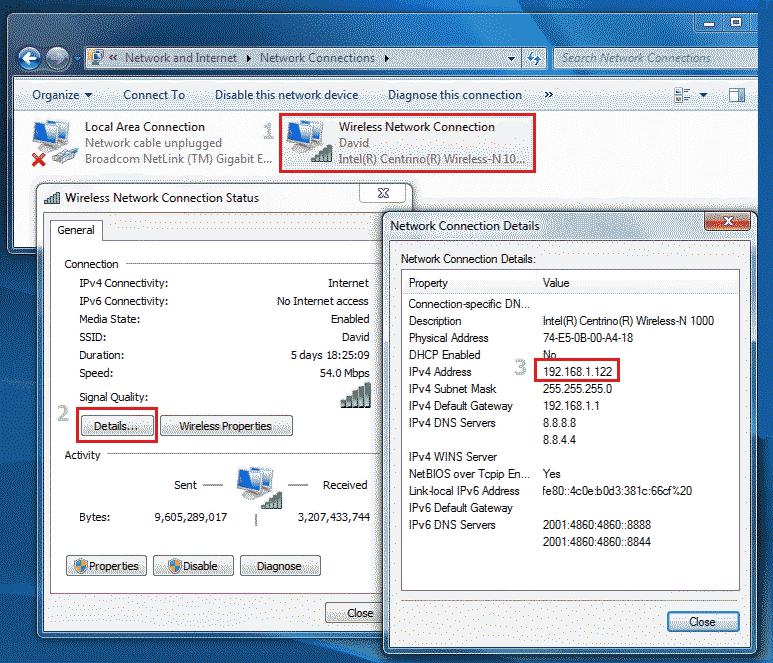
In Windows, view current DHCP-assigned or "fixed" IP and Gateway addresses via Network Connections. Example is shown below. I use Google's 8.8.8.8 and 8.8.4.4 DNS servers.
Learn by example how to change to a "fixed" IP and Gateway address